Sharing & publishing
Publish your form, then share it by link, QR code or embed.
A form must be live before it can collect responses. Click Publish in the builder's top right. If you open Share on a draft, it offers Go Live now instead.
Share link and QR code
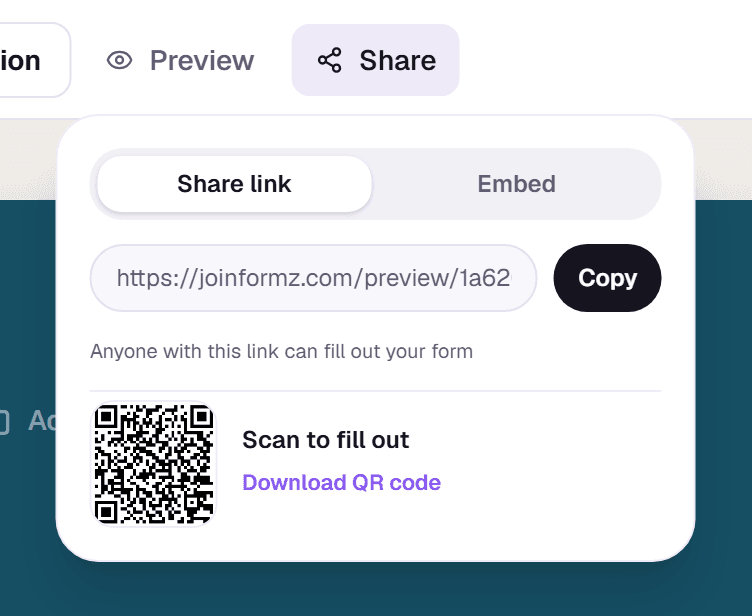
Once live, Share → Share link gives you the form's address to copy, plus a QR code you can download as a PNG for posters, slides or events.
Embed on your site
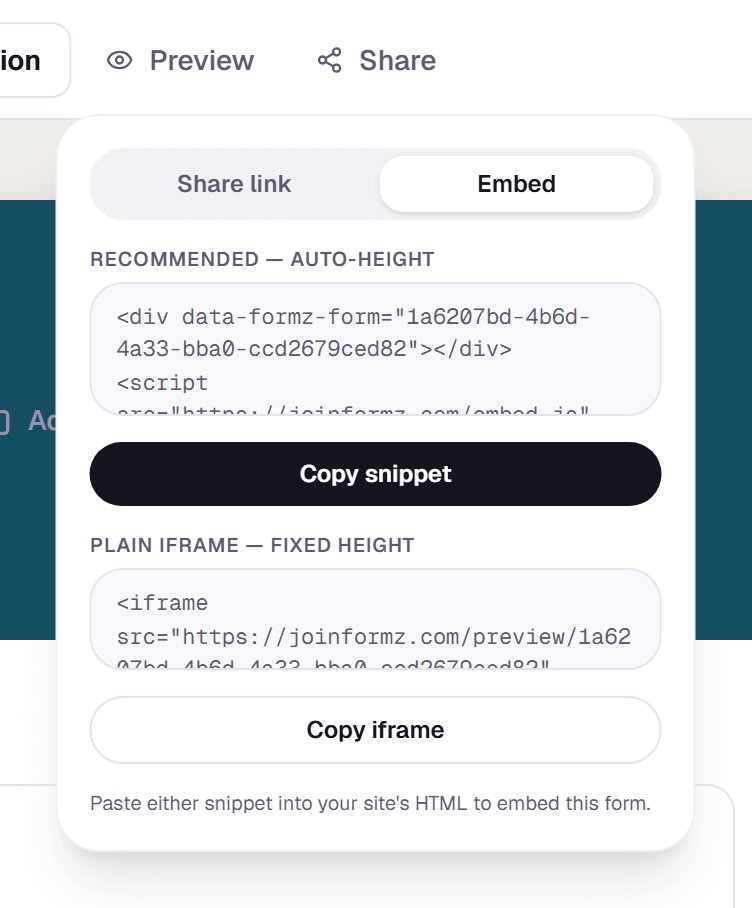
Share → Embed offers two snippets. The recommended one adds a <div data-formz-form="..."></div> and a small script, and resizes to fit the form as people move through it. The plain <iframe> snippet has a fixed height and needs no script. Paste either into your site's HTML.
Pause or take a form offline
The status menu beside Publish shows whether a form is Draft, Live or Paused. Pause stops new responses: visitors see "Not accepting responses" instead of the form; Resume turns it back on. Take Offline returns the form to a draft.
On a phone or small tablet
On screens narrower than a laptop, opening a form shows Edit, Responses and Analytics tabs. Edit lets you publish, pause or resume the form, preview it, and copy or share its link and QR code. Below that are the same steps as the desktop menu (Cover page, Questions, Look & feel, Logic, Success page, Lookups, Access and Settings); tap one to open it full screen. On a phone, questions move with the up and down arrows on each card instead of dragging. Responses lists every answer and has Download CSV. It's the same form, so your changes save as you go and appear everywhere.
To serve forms from your own address, such as forms.yourcompany.com, see Custom domains.